Free Canadian Passport Photo (50×70 mm)

Create an IRCC-compliant passport photo at home in 30 seconds

AI background removal, face centering, and automatic sizing to 50×70 mm at 300 DPI. Download and print at Shoppers Drug Mart, Staples, or any photo lab for under $1.

Works for: Canadian passports, citizenship applications, permanent resident cards, visa photos

✓ Runs in your browser✓ No app to download✓ 300 DPI, print-ready✓ 100% free, no signup

Always verify your photo meets IRCC requirements before submitting your application.

Upload Your Photo

Designed to meet U.S. State Department photo requirements

You'll get: a 2×2 photo and a 4-Up 4×6 print sheet

Photo Requirements

  • Even lighting on face — no shadows
  • Both ears visible — tuck hair back
  • Neutral expression — mouth closed
  • Face camera straight — no tilt or turn
  • Clear, sharp photo — clean your lens
  • Plain background — white or light color

Top Rejection Reasons

  • Shadows on face (harsh overhead or side lighting)
  • Ears hidden by hair or head angle
  • Blurry or low-resolution image

Upload Photo (30 seconds)

Click to browse, drag & drop, or paste (Ctrl+V)

Before & After

Upload any selfie or portrait — our AI handles background removal, face centering, and 50×70 mm cropping.

Original portrait photo before Canadian passport photo processing

Your Photo

Any selfie or portrait works

50×70 mm Canadian passport photo with white background
50 mm70 mm

50×70 mm Photo

591×827 px at 300 DPI

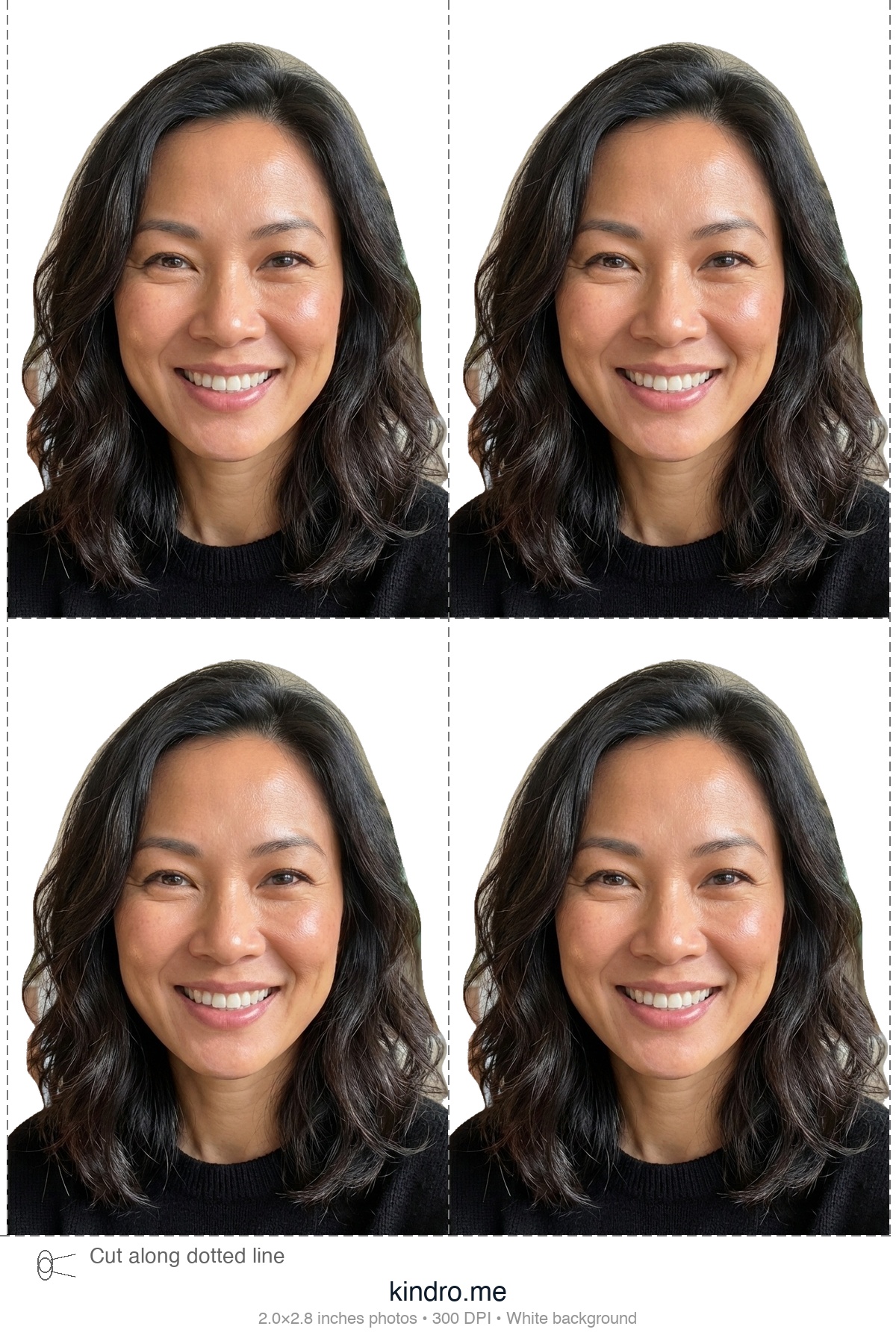
4×6 Canadian passport photo print layout
4×6 glossy print paper

Print-Ready Layout

Print at Shoppers, Staples, or Walmart

How It Works

1

Upload

Take a front-facing photo with your phone against any background and upload it.

2

AI Processing

Our AI removes the background, centres your face, and crops to 50×70 mm at 300 DPI.

3

Download & Print

Download your photo and print at any pharmacy or photo lab for under $1.

Print at Shoppers Drug Mart, Staples, or Walmart

Download the 4-up print layout and print it as a single 4×6 inch glossy photo at Shoppers Drug Mart, Staples, London Drugs, Walmart Canada, or any local photo lab. Cut along the guides to get your 50×70 mm passport photos.

A standard 4×6 glossy print costs under $1 at most stores, compared to $15–$20 for their passport photo service.

Canadian Passport Photo Requirements (IRCC)

Photo Specifications

  • 50×70 mm (approx. 2×2.75 inches)
  • White or light-coloured plain background
  • Face height (chin to crown): 31–36 mm
  • Taken within the last 6 months

Tips for Best Results

  • Face the camera directly with a neutral expression
  • Use good natural lighting, no shadows on face
  • Both eyes open and clearly visible

Common Rejection Reasons

  • Shadows on face or background
  • Red-eye or glare on glasses
  • Photo older than 6 months
  • Incorrect dimensions or low resolution

Frequently Asked Questions

What size is a Canadian passport photo?

Canadian passport photos must be 50 mm wide by 70 mm tall (approximately 2 by 2.75 inches). At 300 DPI, the digital dimensions are 591 by 827 pixels. Kindro automatically crops and sizes your photo to meet these exact specifications.

Can I take my own Canadian passport photo at home?

Yes. Any modern smartphone camera has more than enough resolution. Use good natural lighting and a plain white or light-coloured background. Kindro's AI removes the background, centres your face, and formats the photo to IRCC specifications.

Is this free? What is the catch?

Kindro is completely free with no signup, no watermarks, and no hidden fees. You get the full-resolution 300 DPI passport photo and a 4-up print layout ready for any pharmacy or photo lab.

Where can I print my Canadian passport photo?

Download the 4-up print layout and print it as a 4 by 6 inch glossy photo at Shoppers Drug Mart, Staples, London Drugs, Walmart Canada, or any local photo lab. A standard 4 by 6 print costs under $1. Cut along the guides to get your 50 by 70 mm photos.

Can I use this photo for a Canadian visa or PR card?

Yes. The 50 by 70 mm format is the standard for Canadian passports, citizenship applications, permanent resident cards, and most Canadian immigration documents. Always verify the specific requirements for your application type.

Do I need a guarantor to sign my photo?

For passport applications, one of your photos must be signed on the back by a guarantor. Kindro provides the correctly sized photo; you handle the guarantor signature separately after printing.

Make Your Own Canadian Passport Photo at Home

You don't need a studio or appointment. Use our free tool to automatically remove the background, center your face, and format your photo to IRCC standards — 50×70 mm at 300 DPI.

All you need is a smartphone with a decent camera and natural lighting. Take the photo against any wall — our AI replaces the background with compliant white.

Why Use Kindro for Canadian Passport Photos?

Kindro is a free, browser-based passport photo tool. No ads, no accounts, no data stored. Your photo is processed on our server only for the time it takes to generate your result. Built to save you a trip to the store and a $15–$20 fee.

Most online passport photo services advertise as free but lock the full-resolution download behind a paywall. Kindro gives you the complete 300 DPI file and a ready-to-print 4×6 layout at no cost. Works on any device — desktop, tablet, or phone.

14-Point AI Verification Pipeline

Every photo runs through 14 automated compliance checks plus a GPT-4o Vision review — the most thorough free passport photo verification available.

Geometry & Positioning

  • 1
    Dimensions — Pixel-perfect match to IRCC spec (591×827 for 50×70mm)
  • 2
    Head Height — Forehead-to-chin measurement within IRCC range
  • 3
    Eye Position — Eye height from bottom edge within required range
  • 4
    Face Centered — Horizontal offset under 5% of frame width
  • 5
    Eye Midpoint — Euclidean distance to target center under 4% of height

Face & Expression

  • 6
    Expression — Mouth-open and smile ratios confirm neutral expression
  • 7
    Head Position — 3-axis pose check: yaw ±10°, pitch ±5°, roll ±5°
  • 8
    Eyes Open — Eye Aspect Ratio analysis confirms both eyes are open
  • 9
    Glasses Detection — Eye region brightness analysis flags eyewear
  • 14
    Both Ears Clear — Tragion geometry + brightness analysis detects hidden ears

Image Quality

  • 10
    Sharpness — Laplacian variance detects blur or soft focus
  • 11
    Lighting — Left/right face brightness ratio detects uneven shadows
  • 12
    Exposure — Skin-tone-aware brightness check (won't penalize darker skin)
  • 13
    Image Quality — Contrast analysis flags flat or washed-out photos

AI Second Opinion

If all 14 checks pass, a GPT-4o Vision review inspects the photo for anything the deterministic checks might miss — unusual angles, partial obstructions, or subtle expression issues.

The AI review generates assessments against IRCC (Immigration, Refugees and Citizenship Canada) official photo requirements.

Likely CompliantBorderlineNeeds Improvement

Green checks are hard requirements. Yellow checks are advisory warnings. Final acceptance is always determined by the issuing authority.

Kindro vs. Other Passport Photo Tools

FeatureKindroOther Tools
Download qualityFull 300 DPI, no watermarkLow-res preview; pay $3–$10 for full file
Cost100% freeFree to try, paywall on download
Account requiredNo signup neededEmail or social login required
Print-ready layout4×6 sheet with 4 photos includedSingle photo only; print layout extra
Compliance verification14-point check + GPT-4o Vision reviewBasic face detection only, if any
Upload-Ready

Upload-Ready Passport & Visa Photos

Optimized for online submission — correct file size, dimensions, and format

Don't just create a passport photo — create one that's ready for online submission. Our Upload-Ready export optimizes the image for dimensions, format, and file size. This helps reduce common upload problems such as oversized files or incompatible photo output.

  • Correct crop and background
  • Correct dimensions for your country
  • File size optimized for upload portals
  • JPEG format — universal compatibility
  • Metadata stripped for privacy
  • Ready for online submission
My passport photo file is too large. Can this help?

Yes. Our Upload-Ready download automatically compresses your photo to a portal-friendly file size while preserving quality. It strips unnecessary metadata and exports in optimized JPEG format — ready for government portals, visa applications, and online passport renewals.

What does Upload-Ready mean?

Upload-Ready means the photo is optimized for online submission — not just visually compliant, but also the right file size, format, and dimensions for government upload portals. This reduces the chance of rejection due to technical issues like oversized files.

Upload-Ready export included free with every photo

Passport Photos for Other Countries

Free tools for other passport photo sizes

CountryPhoto SizeTool
🇺🇸 United States2×2 in (51×51 mm)Get Photo →
🇬🇧 United Kingdom35×45 mmGet Photo →
🇫🇷 France35×45 mmGet Photo →
🇩🇪 Germany35×45 mmGet Photo →
🇪🇸 Spain26×32 mmGet Photo →
🇮🇹 Italy35×45 mmGet Photo →
🇮🇳 India2×2 in (51×51 mm)Get Photo →
🇯🇵 Japan35×45 mmGet Photo →
🇰🇷 South Korea35×45 mmGet Photo →
🇦🇺 Australia35×45 mmGet Photo →
🇧🇷 Brazil2×2 in (51×51 mm)Get Photo →
🇲🇽 Mexico35×45 mmGet Photo →
🇹🇼 Taiwan35×45 mmGet Photo →
🇨🇳 China33×48 mmGet Photo →
🇹🇷 Turkey50×60 mmGet Photo →
🇵🇰 Pakistan35×45 mmGet Photo →
🇮🇩 Indonesia51×51 mmGet Photo →
🇸🇦 Saudi Arabia40×60 mmGet Photo →
🇵🇭 Philippines35×45 mmGet Photo →
🇻🇳 Vietnam40×60 mmGet Photo →
🇹🇭 Thailand35×45 mmGet Photo →
🇲🇾 Malaysia35×50 mmGet Photo →